How to Open a Sina Account for Email
Ever since July 2009 it has been virtually impossible to access Gmail, Hotmail, Yahoo, or any other email client from within the borders of Xinjiang. Currently only one web portal, Sina, has been given the privilege to send and receive emails, but if you can’t read Chinese you might find it difficult to set up an account.
For those who can’t live without their email while traveling in Xinjiang this summer, here is a step-by-step guide to opening an email account on Sina.com.cn, the only mail portal that is open for use in Xinjiang’s post-riot web world.
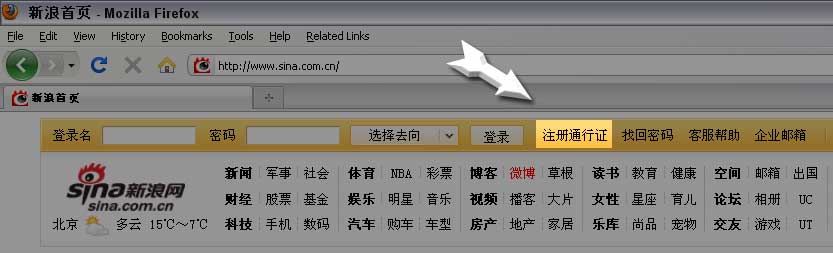
Step 1 – Click to Register
When you first arrive on Sina (https://www.sina.com.cn) it might be overwhelming to see so many foreign characters on the same page. Don’t worry! The top bar is the only part you should be worried about. There you’ll see two input boxes side-by-side followed by a string of Chinese phrases. The one you’re looking for is highlighted in the figure below:
Step 2 – Choose your Username
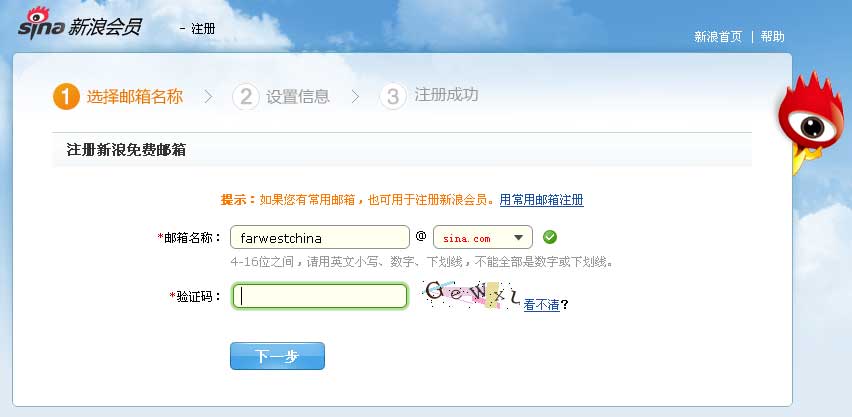
The next screen is going to ask you what you want your new email address to be. In addition to a username, you have the option of choosing a ‘sina.com’ address or a ‘sina.cn’ address. A green checkmark to the right will indicate whether your choice is available.
The second input box is CAPTCHA. The letters won’t appear until the box is actively highlighted, so once you click on the box, fill in the letters and click the button.
Step 3 – Password and Security Question
Now that you’ve chosen your email you need to add a password. The next screen is broken down in six parts:
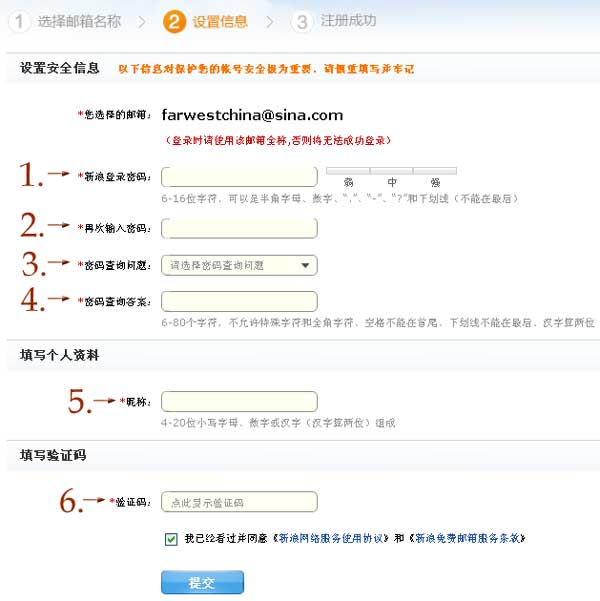
- Password: type in your password and Sina will tell you if it’s good or not (you can also use this password checker to find out)
- Retype your Password: that’s pretty self-explanatory
- Security Question: This drop down list offers 16 questions you can use OR if you click the very last one you can enter your own. The catch is it has to be less than 32 characters and can’t contain anything other than letters (not even question marks!).
- Security Question Answer: 80 characters max without any special symbols
- Nickname: choose your nickname and make sure it contains no capital letters or special symbols
- Another CAPTCHA: Again, the letters won’t show until you highlight the actual input box.
Finally, checking the bottom box authorizes the sale of your soul to Sina…or that you accept their terms of use.
Step 4 – Success! Now Log In
Once you fill in the above form and click submit you will hopefully be greeted by the following screen:
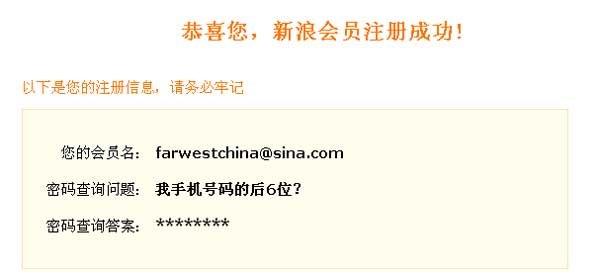
Here you see that I successfully registered “[email protected]” using the last six digits of my cell phone number as my security question. Granted, I won’t actually be checking this account right now, so if you want to contact me please use the FarWestChina Contact Page.
Last but not least, go back to Sina’s Homepage and use the two top-left input boxes to put in your new email address (don’t forget to add the ‘@sina.com’ or ‘@sina.cn’) and then your password. Press enter and you’re in!
From here on out the email interface should be familiar even if you can’t read Chinese.
Final Suggestions:
This goes for anybody traveling to Xinjiang, not just those who would have needed help setting up a Sina account.
- If you’re going to be in Xinjiang for a while, set up your previous email account to forward all emails to your new Sina account. That way you don’t have to constantly be looking for a new work-around to the block like I did every day. Getting on Sina is easy (and legal).
- Take along a list of contacts you want to email. If you’re like me, you keep all your email contacts in an online database. You won’t be able to access that in Xinjiang, so unless you have all those emails memorized, print them out and take them with you (or email them to your Sina account!).
If you have the chance I highly suggest you take a trip out to Xinjiang. Make sure you come prepared, though, and your journey will be that much easier.